
Understanding ports and protocols is essential for passing the CompTIA A+ Core 1 (220-1201) exam. In this guide, you’ll learn what each port does, when it is used, and test your knowledge with exam-style questions.
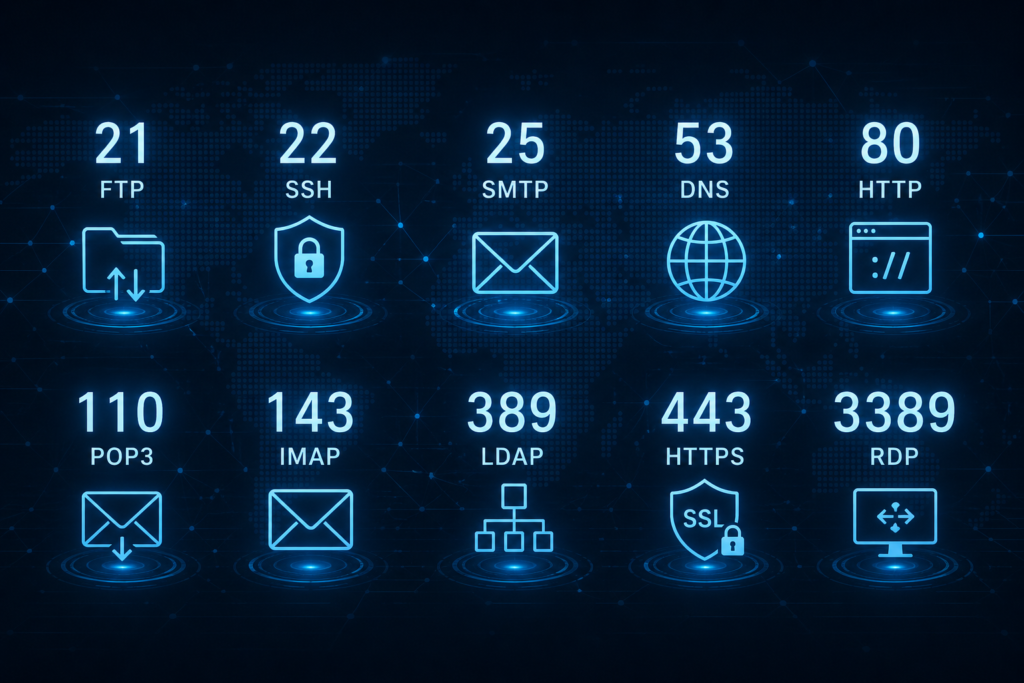
Essential Ports and Protocols You Must Know
Port 20/21 – FTP (File Transfer Protocol)
- Used for transferring files between devices over a network
- Port 20 is for data transfer, and port 21 is for control commands
Scenario: A technician uses FTP (ports 20/21) to transfer firmware
updates to a network device.
Port 22 – SSH / SFTP
SSH provides secure remote access to systems. SFTP uses SSH to securely transfer files with encryption.
Scenario: An IT admin securely connects to a Linux server via SSH
(port 22) to perform system updates.
Port 23 – Telnet
Telnet provides remote command-line access but does not encrypt data, making it insecure.
Scenario: A technician uses Telnet (port 23) in a legacy system to
troubleshoot a network device but later recommends switching to
SSH for security.
Port 25 – SMTP
SMTP is used to send emails between servers or from a client to a mail server.
Scenario: A technician configures a mail server to send emails
using SMTP (port 25) with encryption enabled for security.
Port 53 – DNS
DNS translates domain names into IP addresses.
Scenario: The IT team configures a DNS server to resolve internal
domain names to private IP addresses for office devices (port 53).
Port 67/68 – DHCP
DHCP automatically assigns IP addresses and network settings to devices.
Scenario: A technician sets up a DHCP server (ports 67/68) to
dynamically assign IP addresses to devices in a growing office.
Port 80 – HTTP
HTTP is used for unencrypted web traffic.
Scenario: A web developer tests a staging website over HTTP (port
80) before migrating it to HTTPS for production.
Port 110 – POP3
POP3 downloads emails from the server to a local device.
Scenario: A technician helps a user set up their email client to
retrieve emails using POP3 (port 110) for offline access.
Port 143 – IMAP
IMAP keeps emails on the server and synchronizes them across devices.
Scenario: A user needs access to emails across multiple devices,
and a technician configures the email client to use IMAP (port
143).
Port 137–139 – NetBIOS
NetBIOS supports file and printer sharing in older Windows networks.
Scenario: A legacy system uses NetBIOS (ports 137-139) for
file sharing, and a technician secures the network by isolating the
legacy system.
Port 389 – LDAP
LDAP is used for directory services and centralized authentication.
Scenario: A technician configures an LDAP server (port 389) to
centralize user authentication for a corporate network.
Port 443 – HTTPS
HTTPS provides secure, encrypted communication over the web.
Scenario: user authentication for a corporate network.
HTTPS – A technician installs an SSL certificate on a web server,
enabling secure HTTPS communication (port 443).
Port 445 – SMB/CIFS
SMB allows file and printer sharing in Windows networks.
Scenario: A technician configures a Windows server for file sharing
using SMB (port 445), allowing users to access shared folders on
the network.
Port 3389 – RDP
RDP allows remote desktop access to Windows systems.
Scenario: An IT admin uses RDP (port 3389) to troubleshoot a
remote Windows workstation.
TCP vs UDP (Quick Explanation)
TCP is connection-oriented and ensures reliable delivery of data. UDP is faster but does not guarantee delivery.
- TCP – A technician configures a mail server to use TCP, ensuring reliable data transfer when sending large email attachments.
- UDP – A technician configures a video conferencing application to use UDP, ensuring minimal latency during real-time communication.
Examples:
- TCP → HTTP, HTTPS, FTP
- UDP → DNS, DHCP
Watch the Full Video (Ports + Questions)
Test Yourself – Practice Questions
Try to answer before checking the answers below.
Question 1
A technician needs to remotely access a Windows system with a graphical interface.
Which port should be opened?
- Port 21
- Port 22
- Port 3389
- Port 80
Question 2
A user wants to access email across multiple devices with synchronization.
Which port should be used?
- Port 110
- Port 25
- Port 143
- Port 80
Question 3
A technician needs secure file transfer using encryption.
Which port should be used?
- Port 21
- Port 22
- Port 80
- Port 443
Answers and Explanations
Question 1
Correct answer: Port 3389
RDP uses this port for remote desktop access.
Question 2
Correct answer: Port 143
IMAP allows email synchronization across devices.
Question 3
Correct answer: Port 22
SFTP uses SSH on port 22 for secure file transfer.
Get Full Practice Tests More Challenging Exam Style
Get 700+ CompTIA A+ Core 1 220-1201 practice questions with detailed explanations
FAQ
Do I need to memorize port numbers for CompTIA A+?
Yes, common ports like 21, 22, 25, 53, 80, 110, 143, 389, 443, and 3389 are frequently tested.
What is the difference between TCP and UDP?
TCP is reliable and connection-based, while UDP is faster but less reliable.